iPhone 17 Pro Max Button Functions
iPhone 17 Pro Max Button Functions Complete Guide The iPhone 17 Pro Max is expected to continue Apple’s tradition of clean design combined with powerful functionality. While most people focus on camera upgrades and performance, the physical buttons on the device play a very important role in everyday usage. Understanding how each button works can make your experience faster, smoother, and more efficient. In this guide, you will learn all the important button functions of the iPhone 17 Pro Max in a simple and clear way.
Power Button Functions
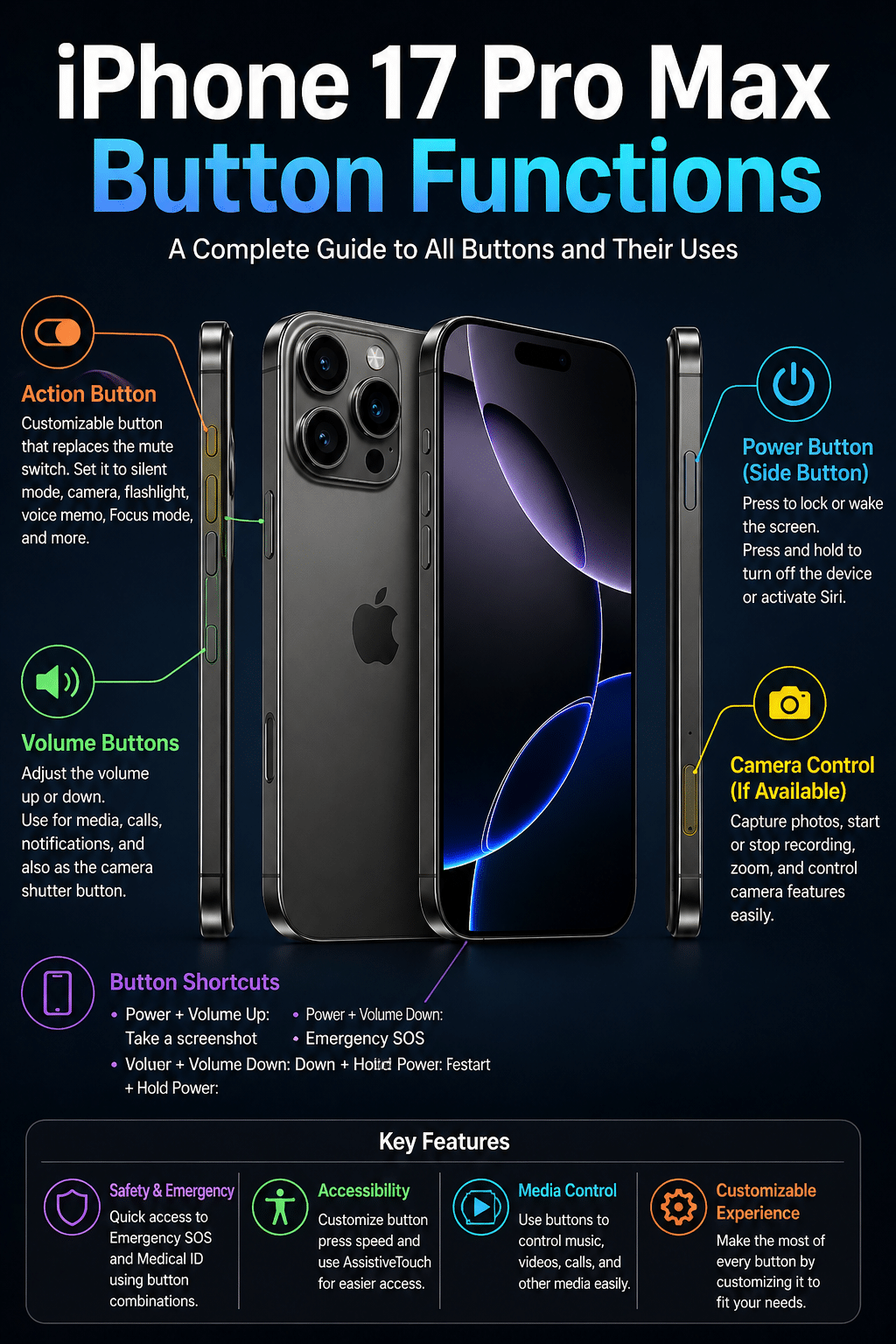
The power button, also known as the side button, is one of the most used buttons on the iPhone 17 Pro Max. A single press of this button will turn the screen on or off. When your phone is locked, pressing it once will wake the device so you can check notifications or time.
If you press and hold the power button along with the volume up button, it will open the power menu where you can switch off the device. This combination also allows access to emergency SOS features, which can be very useful in urgent situations.
Another important function is activating Siri. By pressing and holding the power button, you can quickly launch Siri without touching the screen. This is helpful when your hands are busy or when you want to perform tasks using voice commands.
iPhone 17 Pro Max Button Functions
Volume Buttons Functions
The iPhone 17 Pro Max includes two volume buttons on the left side. The upper button increases volume, and the lower button decreases it. These buttons control sound levels for calls, music, videos, and notifications.
During calls, pressing these buttons adjusts the call volume. When listening to music or watching videos, they control media volume. You can also use them to mute incoming calls quickly by pressing either volume button once.
Another useful feature is taking photos. When the camera app is open, pressing either volume button works as a shutter button. This makes it easier to take stable pictures, especially when using one hand.
Volume buttons also play a role in screenshots. By pressing the power button and volume up button at the same time, you can capture whatever is on your screen instantly.
iPhone 17 Pro Max Button Functions
Action Button Features
The iPhone 17 Pro Max is expected to continue with the Action Button, replacing the traditional mute switch. This button is customizable, meaning you can assign different functions based on your needs.
By default, the Action Button can switch between silent and ring modes. However, users can change its function to open the camera, turn on the flashlight, start voice recording, or launch specific apps.
This flexibility makes the Action Button one of the most powerful controls on the device. Instead of navigating through menus, you can perform important tasks instantly with a single press.
iPhone 17 Pro Max Button Functions
Combination Button Shortcuts
Apple devices are known for smart shortcuts using button combinations, and the iPhone 17 Pro Max is no different. These shortcuts help you save time and perform actions quickly.
For example, pressing the power button and volume up button together captures a screenshot. If you press and hold the power button with the volume down button, it can trigger emergency SOS depending on settings.
To force restart the device, you need to press volume up, then volume down, and then press and hold the power button until the Apple logo appears. This is useful when the phone becomes unresponsive.
Another important shortcut is entering recovery mode, which is often used during software updates or troubleshooting. These combinations make it easier to control the device without relying only on touch.
iPhone 17 Pro Max Button Functions
Button Functions for Accessibility
The iPhone 17 Pro Max also supports accessibility features through its buttons. Users with different needs can customize how buttons respond.
For example, you can adjust how long you need to press a button to activate certain functions. This is helpful for people who may find quick presses difficult.
AssistiveTouch is another feature that reduces reliance on physical buttons. Even though it is a software feature, it works alongside button functions to give users more control over the device.
These options ensure that the phone is usable for everyone, regardless of their physical abilities.
iPhone 17 Pro Max Button Functions
Camera and Media Control Using Buttons
Buttons on the iPhone 17 Pro Max are not just for basic control. They also enhance your camera and media experience.
When using the camera, volume buttons can act as a shutter, making photography more natural. You can also hold the volume button to record videos quickly.
For music lovers, the volume buttons allow quick adjustments without unlocking the phone. Combined with lock screen controls, this makes media handling very easy.
These small features improve daily usage and make the device feel more responsive and user friendly.
iPhone 17 Pro Max Button Functions
Safety and Emergency Functions
Safety is another area where button functions are very important. The iPhone 17 Pro Max includes emergency features that can be activated using button combinations.
By pressing and holding the power button with a volume button, users can quickly access emergency SOS. This can call emergency services and share your location with contacts.
There is also a feature to quickly disable Face ID by pressing certain button combinations. This adds an extra layer of security in sensitive situations.
These safety features show how physical buttons can play a critical role beyond basic usage.
iPhone 17 Pro Max Button Functions
Conclusion
The buttons on the iPhone 17 Pro Max may look simple, but they offer a wide range of powerful functions. From basic tasks like adjusting volume and locking the screen to advanced features like emergency SOS and customizable actions, each button has a purpose.
Learning how to use these buttons effectively can improve your overall experience. It helps you save time, increase productivity, and use your device more efficiently.
Instead of relying only on the touchscreen, mastering button functions gives you better control over your iPhone. As Apple continues to improve its devices, these small details make a big difference in everyday usage.